AI for Football Coaches: Connect ChatGPT or Claude to Your Tactics Board
Most coaches already ask an AI for drills and talks, and get back words. Connected to your studio, the same AI draws the board, plans the session and preps the match, in real metres, in your account.
Ask ChatGPT or Claude for a pressing session and you get a page of text: a warm-up, a game, some coaching points. It reads well. Then you still have to draw it, the distances are a guess, and none of it is on your board. The useful part of an AI for a football coach is not the writing. It is doing the job in the place you already work.
What connecting your AI actually means
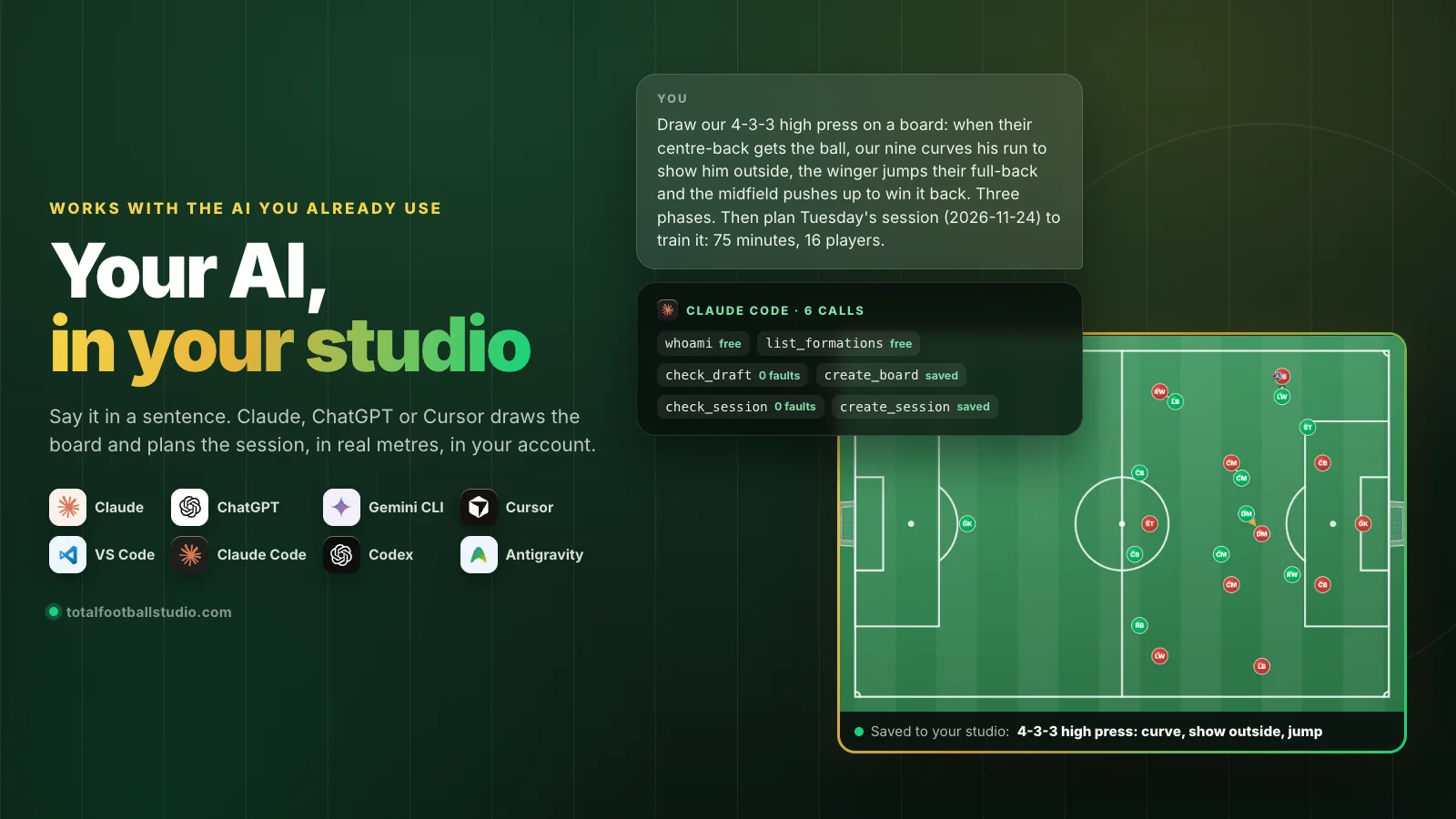
Total Football Studio speaks MCP, the open Model Context Protocol that Claude, ChatGPT, Gemini, Cursor and VS Code all understand. Connect your app once and it gets the studio’s own tools: it can read your boards and training sessions, draw new boards in real metres, plan sessions into your planner, prep a match from your team, read your Manager Lab saves, study past Daily Puzzles and read the Playbook books you own. What it makes is saved to your account and opens in the studio like your own work.
That is the difference from pasting a prompt into a chat. The AI does not describe a board. It drafts one, runs the studio’s check against it, fixes what the check says, and saves it.
One sentence, six calls: a real run
This is a real run in Claude Code, first try. The whole request was one sentence: “Draw our 4-3-3 high press on a board: when their centre-back gets the ball, our nine curves his run to show him outside, the winger jumps their full-back and the midfield pushes up to win it back. Three phases. Then plan Tuesday's session (2026-11-24) to train it: 75 minutes, 16 players.”
- whoami: free
- list_formations: free
- check_draft: 0 faults
- create_board: saved
- check_session: 0 faults
- create_session: saved
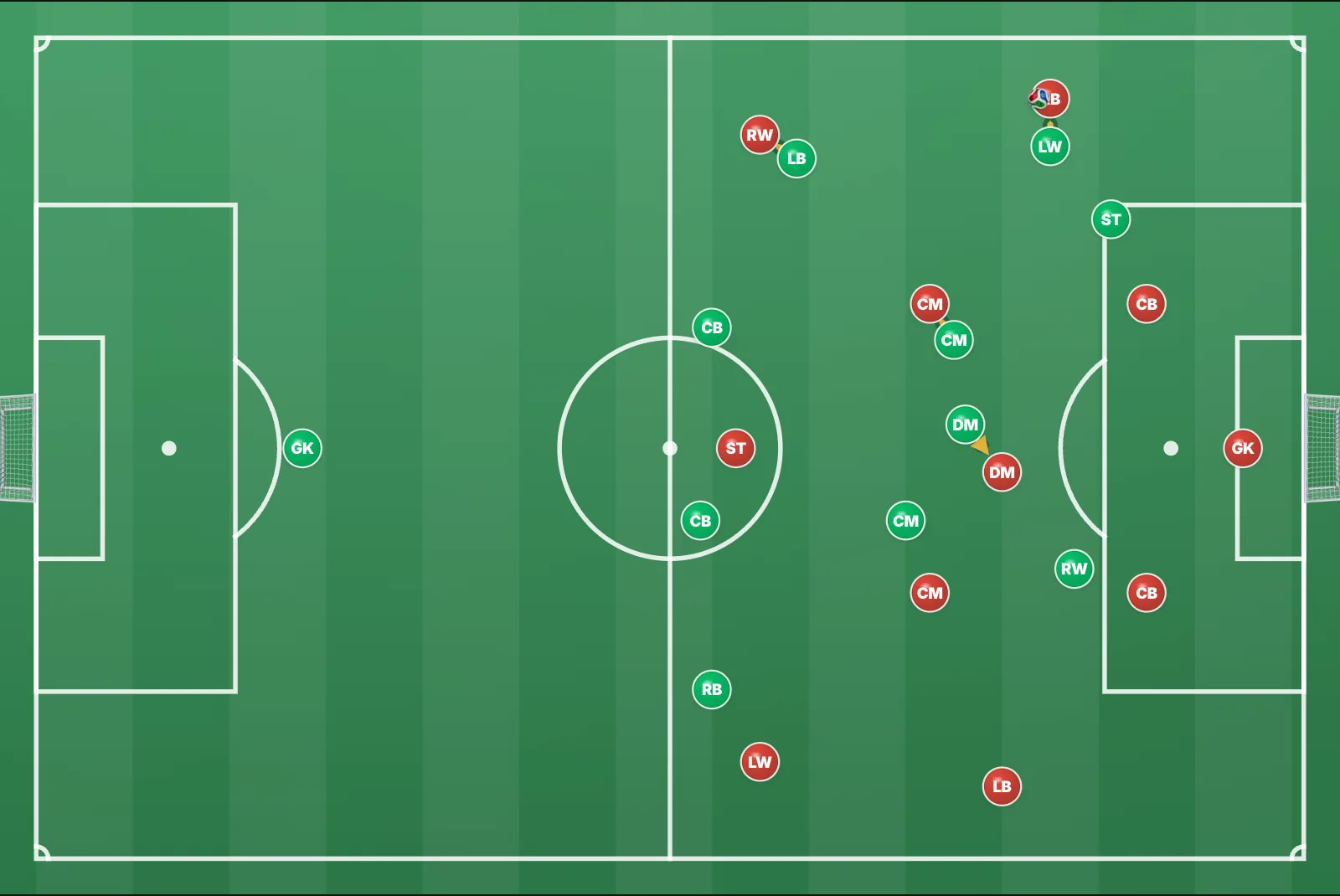
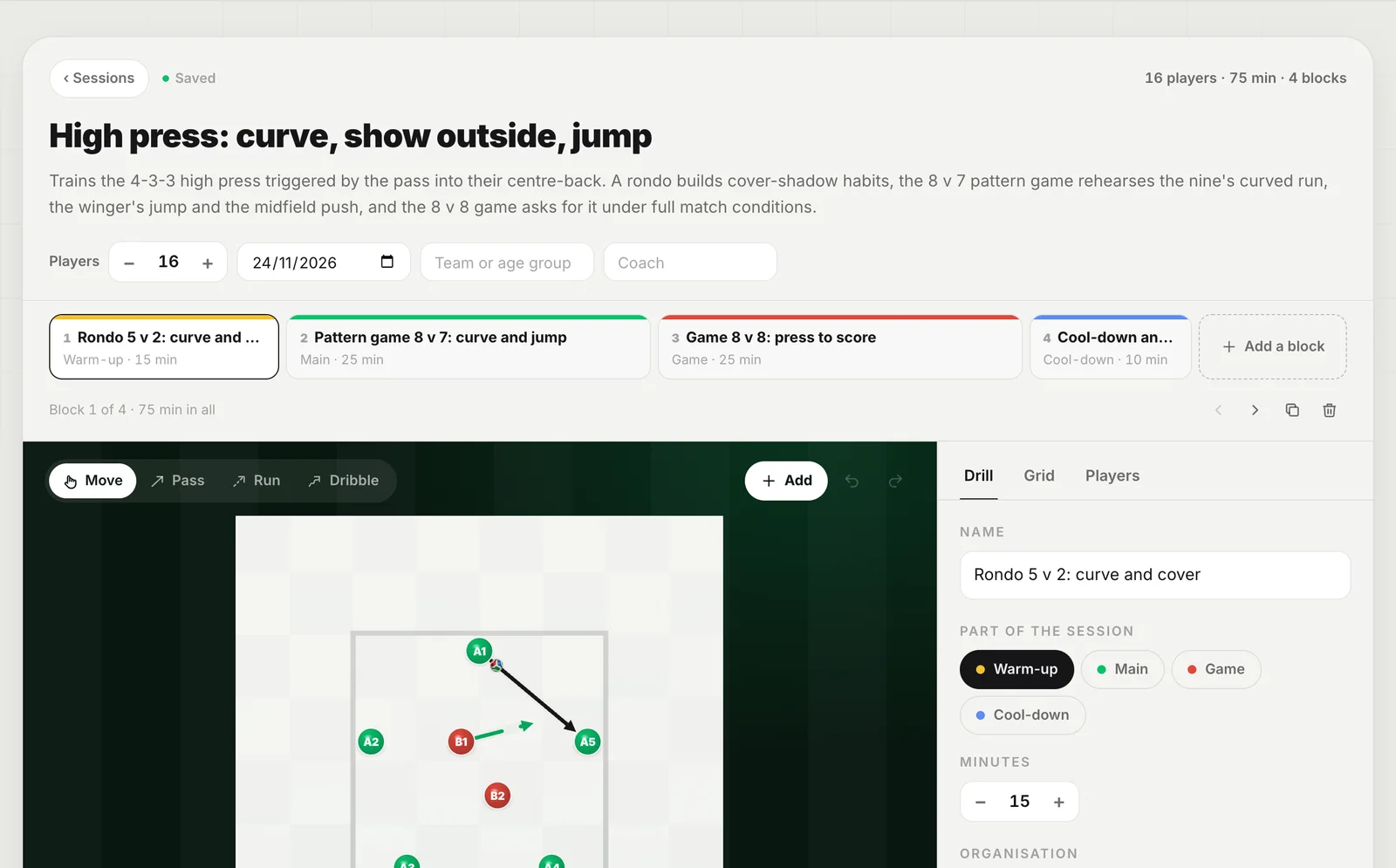
Before saving, it checked the draft. The check speaks in metres: a gap too small, a run too fast for the time it has, a man off the pitch, each with the corrected value. Only a draft with no faults was saved. The same happened to the session that trains it:
What to ask, area by area
Each of these is a job your AI can do in your studio today. Say it your own way; these are starting points.
Boards
- “Draw our 4-3-3 press when their centre-back has it, three phases.”
- “Draw a corner routine: near-post flick, back-post runner, two phases.”
- “Review my last board phase by phase and tell me where the gaps are.”
- “Make my last board upright and tilted for a reel, with one zone on each idea.”
- “Shade the half-space on phase 2 of my 4-3-3 board and label it.”
- “In my match video, how high was their back line when we won the ball?”
- “Tag the turnovers I read out from Saturday’s match, then make a playlist of them.”
- “Add a fourth phase to the press you just drew: we win it and break.”
- “Make a copy of my 4-2-3-1 board so I can try a version where the ten drops in.”
Sessions
- “Plan next week: three sessions for 16 players, 75 minutes.”
- “Turn my 4-3-3 press board into a session that trains it, for Tuesday.”
- “Build a rondo warm-up into a 60 minute pressing session for 14 players.”
- “Put my finishing session on Thursday as well.”
Your e-books
- “What do my e-books say about pressing triggers? Put the key board in my studio.”
- “Build Tuesday’s session from two drills in my e-books, for 16 players.”
- “Sum up chapter 3 of my 4-3-3 Playbook in five points for my staff.”
- “Put a board from my e-book in the studio with my players’ names on the counters.”
Your team
- “Prep Saturday: who is out, a team sheet board and the opponent’s file.”
- “How have we done against teams that play a back three?”
- “How is our number 9’s season going: minutes, goals and training?”
- “Give the day after Saturday’s match a recovery theme in the season plan.”
Manager Lab
- “Which formation suits my squad, and who is the weak link?”
- “Put my save’s best 4-3-3 on a board with the names on.”
- “Who are my best young players, and where should they play?”
Daily Puzzle
- “Explain yesterday’s puzzle and why the best plan works.”
- “Let me try a different answer on last Monday’s puzzle.”
- “Which puzzle this month did I score lowest on, and what did I miss?”
The AI does the thinking. The studio does the metres, the check and the saving.
Which AI apps work
Claude and ChatGPT connect by signing in: you add one address as a connector and sign in to your studio, with no key to copy. Claude Code, Codex, Cursor, VS Code, Gemini CLI and Antigravity use a key you make in Settings, ticked for only the parts of the studio you choose. Each app has its own setup page on Total Football MCP.
Set it up in two minutes
- Open Settings in the portal and go to AI connections.
- In Claude or ChatGPT, add the address shown there as a custom connector and sign in. For any other app, press New key and paste the line it shows.
- Tick what it may reach: Boards, Sessions and Daily Puzzle to start with, Manager Lab and Your team when you want them.
- Ask in a sentence. What it makes lands in My boards or Sessions.
The Connect your AI guide has every step, with pictures.
What it will never do
It never deletes your work. It adds new boards, sessions, copies, tagged moments and playlists, and when you ask it to change a board it keeps the version from before, one click on Restore away. Your sessions, team sheets and Manager Lab saves are never changed. Notes about your players need a tick of their own, never on by default, because your players are often children and what your AI reads goes to the AI company you chose.
On the board The Pressing Trap The pressing trap your AI can draw for you 6 phases → In the Studio Connect your AI Claude, ChatGPT, Gemini, Cursor or VS Code: one sentence, and it is on your board. Open Studio →Planning the week by hand is in how to plan a football training session, and the whole match week in football match preparation, step by step.
Drawn from
Every claim above is on one of these boards.
Nothing in this post teaches something the diagrams do not show. That is a rule, not a coincidence: the article is written from the systems, never the other way round.
The notebook
One system, explained, every week.
The diagram, the principle, and the detail most people miss. Unsubscribe in one click.
Follow along
Watch the systems move.
Short tactics reels, every frame drawn, no broadcast clips. Follow along wherever you scroll.
Read next
Your Football Coaching Books, Inside ChatGPT and Claude
A coaching book helps on the day you use it. Connected to your studio, ChatGPT or Claude reads the Playbook books you own, finds the page you need and puts its boards and sessions where you plan.
How to Plan a Football Training Session, Block by Block
A session plan is four decisions per block: what it is for, how long it runs, how big the grid is, and what the players have to get right. Write those down and the session runs itself.
Moving Beyond X's and O's: Designing Drills with Digital Training Gear
Coaches are visual learners, but a tactical board with just arrows leaves too much to the imagination. Enter digital cones, mannequins, and hurdles.