Features
Everything in the tactics board.
Total Football Studio is an animated football tactics board for coaches and analysts. Here is all of it, in the order you would use it: the pitch, your players, what you draw, how it moves, and how it reaches your squad.
- pitch views
- 9
- formations
- 25
- pieces of training gear
- 17
- ready-made systems and drills
- 19
01 · The board
A pitch for the match, the set piece and the session.
Every board is drawn to the real dimensions of a pitch, so a distance you show is a distance your players will run.
Match
6 boards-
Full pitch
Both goals, end to end.
-
Full pitch (upright)
Both goals, played up the screen.
-
Two thirds
Defensive third to their goal.
-
Their half
Halfway line to their goal.
-
Our half
Our goal on the left, danger arriving from the right.
-
Their box
Close in on the penalty area.
Set pieces
2 boards-
Attacking corner, in-swinger
Taken from the right, bent towards the goal, three arriving across the six.
-
Defending a corner, zonal
Four across the six, both posts filled, two men picked up, one out short.
Training
1 board-
Training grid
A rondo in a 30 by 20, and every dimension of it is yours to drag.
-
Six match views
full pitch, full pitch (upright), two thirds, their half, our half and their box. Switching view never moves a player: everyone stays on the same patch of grass and you see more or less of it.
-
Boards for corners and free kicks
An attacking and a defending goalmouth, with five routines ready to deal onto them: attacking corner, in-swinger, attacking corner, short, defending a corner, zonal, wide free kick, delivered and defending a free kick, wall.
-
Training grids in metres
Any coned area from 8 x 8 to 95 x 60 metres, or a preset: rondo boxes, possession grids and small-sided pitches for 5v5, 7v7, 9v9 and 11v11.
-
Coaching zones on the grass
Rule the pitch into thirds, five channels, channels and thirds or 18 zones (numbered), drawn at the real distances rather than by eye.
-
Four pitch surfaces
Paper, Broadcast, Night and Chalk. Paper prints best; Broadcast and Night read like a match on television, which suits a screen in a dark room.
-
A tilted, broadcast pitch
Lean the pitch back like a television camera: the grass tilts away, the players stand up and shrink with distance, and the goals stand in real depth. Pose on the flat board while you edit, and film it tilted.
-
Snap, zoom and pinch
Drop a player near the line of another and they settle level with them or in the same channel. Zoom in when counters crowd together, or pinch on a touch screen.
02 · Players and squad
Your formation, your squad, your colours.
Put a shape down in one press, then make it your team: the names, the faces, the kit and the crest.
Every formation on the board
- 4-4-2
- 4-4-2 diamond
- 4-3-3
- 4-3-3 double pivot
- 4-3-3 false 9
- 4-2-3-1
- 4-1-4-1
- 3-5-2
- 3-4-3
- 3-2-4-1 (box)
- 5-3-2
- 5-4-1
- 4-2-3-1 narrow
- 4-4-1-1
- 4-5-1
- 4-3-1-2
- 4-2-2-2 (box)
- 4-2-4
- 3-4-1-2
- 3-4-2-1
- 3-1-4-2
- 5-2-3
- WM (3-2-2-3)
- 2-3-5 pyramid
- 3-4-3 diamond
-
Twenty-five formations
From the 4-3-3 and the 4-2-3-1 to the back three, the back five and the WM, plus a blank eleven you can place anywhere. Changing shape asks before it moves anybody, and lets you choose where the new one lands.
-
One lineup across every phase
Pick a player for a role once and the name, number and face change on every phase at once. Nobody moves: the runs and the timing stay exactly as you drew them.
-
Your squad, with faces and flags
Type your players once in your settings, with a number, a photo and a nationality, including England, Scotland, Wales and Northern Ireland. A counter then takes all of it in one press.
-
Player cards
Turn every player into a card in your kit colours: number on its own strip, the photo, the name and the flag. The opposition can be cards too, or stay as plain counters.
-
Kit colours and your crest
Your colours on the counters, with labels that switch between white and black so they stay readable. Your crest sits in the corner of the board and travels into every link, PDF and film.
-
Bibs for training
Add a bib colour and put it on any player, on either side, for a session that is not simply two teams. A bib films and prints like a kit.
-
One more player, where you need one
Drop a single opposition player for a 1v1, a 2v1, a pressing trigger or a rondo, or one more of your own for a twelfth man, a coach or a shape that is not eleven a side.
-
Position or number
Counters show the position a player fills or their shirt number, with the name below or above.
03 · Drawing tools
Mark it up the way you would on a whiteboard.
Eleven counters on grass is a team sheet. The passes, runs, blocks and words drawn over them are what make it a session, and they carry into the next phase with the players.
-
Five arrows for five actions
Pass for the ball played to a teammate, Run for movement off the ball as a dashed line, Carry as a squiggle for the ball at the feet, Press for pressure and the angle it comes from, and Loft for a ball struck off the grass.
-
Arrows that hold on to players
Draw from one counter to another and the arrow holds on to both. Add a phase and the player walks the arrow with them: nothing to redraw.
-
Arrows in your style
solid, dashed, dotted or wavy, with arrow, both ends, stop bar or none at the end. Bow it, give it an S, set the weight, or fade it out on the early phases and bring it in when it matters.
-
Blocks
Thread a line through the players you pick and shade their space: back to the goal they defend, or closed around them. It moves when they move.
-
Danger areas and zones
Gold for the space the move is trying to reach, grey for a channel to protect or a trap to set. Nine colours, solid or hatched, as a box, a circle, a triangle or a diamond.
-
Lines
A plain line with no arrowhead for the heights and edges: the line of confrontation, an offside line, the edge of a block. Hold Shift and it comes out straight.
-
Text on the grass
Any words, anywhere on the board, at any size: a trigger, a coaching point, a name for a space. Turn it to run along a touchline.
-
Nothing drawn twice
Cones, zones and lines carry forward to the phases after the one you change, so a session layout is set once.
04 · Training gear
Seventeen pieces of kit, drawn to size.
Every piece is sized in metres against the grid, so an agility ladder is a ladder and a drill on the board is a drill you can lay out on the grass.
-
 Marker cone
 -
 Traffic cone
 -
 Mini hurdle
 -
 Mini hurdle, yellow
 -
 Agility hurdle
 -
 Agility ladder
 -
 Mini goal
 -
 Mannequin
 -
 Inflatable defender
 -
 Training pole
 -
 Bosu ball
 -
 Balance disk
 -
 Balance disk, yellow
 -
 Balance pad
 -
 Foam roller
 -
 Dumbbell
 -
 Resistance bands
-
Cones and markers
marker cone and traffic cone.
-
Hurdles and ladders
mini hurdle, mini hurdle, yellow, agility hurdle and agility ladder.
-
Goals and mannequins
mini goal, mannequin, inflatable defender and training pole.
-
Strength and balance
bosu ball, balance disk, balance disk, yellow, balance pad, foam roller, dumbbell and resistance bands.
-
Size it, turn it, move it
Press a piece to put it down, drag it into place, then size it and turn it. Gear belongs to a phase and moves between phases on Play, so widening a gate is something you show.
-
Eight balls
Match balls from Trionda, Al Rihla, Brazuca, Jabulani and Telstar, plus a training ball, a spare and a plain one. The 1974 Telstar for a Total Football session, the Trionda for anything current.
-
A ball that leaves the ground
Draw a Loft and the ball climbs off the grass and leaves its shadow on the ground. A Height slider sets how high: low for a cutback, high for a goal kick.
05 · Animation and camera
Pose each phase. The movement is worked out for you.
You never draw the movement and there is no timeline. Build the board, copy it, move the players, and the studio animates the difference.
Phase 1
You pose it
Phase 2
You pose it again
Play
Worked out for you
-
Phases, not keyframes
Add a phase and you get a copy of the board you have. Move the players to where the ball takes them, and the movement between the two is the animation. Drag phases to reorder them.
-
Pace for every phase
Set how long a phase holds, from 0 to 6 seconds, and how long the move to the next takes, from 0.2 to 3 seconds. Eased by default, or linear for an even pace.
-
Trajectories
A soft tail behind every player and ball as they move, on Play, the shared link and the video. See the path before you press Play, too.
-
A camera that follows the ball
Fixed shows the whole view, Follow the ball travels with it (and you choose which ball), and Manual lets you frame every phase yourself and set how far it pushes in.
-
The camera flies between views
Pick a different pitch view or tilt on any phase and the camera pans, zooms and turns there during the move, from the full pitch to the box and back.
-
A title and a note on every phase
A short name for the moment ("The trigger", "The switch") and one line explaining it, shown under the board and in the strip of phases.
-
Sequences you keep
Save a run of phases, from the whole pitch or one region of it, to your own library. It keeps the movement and drops the names, so it runs on whoever stands there in the next system, on either flank.
-
Start from ours
Nineteen ready-made match systems and training drills on the shelf. Fourteen of them are the files our published films were made from, and open without an account.
A system, or a sequence?
A system is one board and everything on it: the pitch, the shape, every phase and your notes. A sequence is a slice of one with nobody in it: a run of phases with the names taken off, so the same movement runs on whoever stands on the next board.
A system
The whole board
A sequence
A slice of it, names off
Any other system
The pattern, dropped in
Open one of ours, no account needed: The 2-3-5 Build-Up , or see all 14.
07 · Team Talk and staff
Talk it through, present it live, build it together.
The board is where the conversation with your squad and your staff happens, not only where it is prepared.
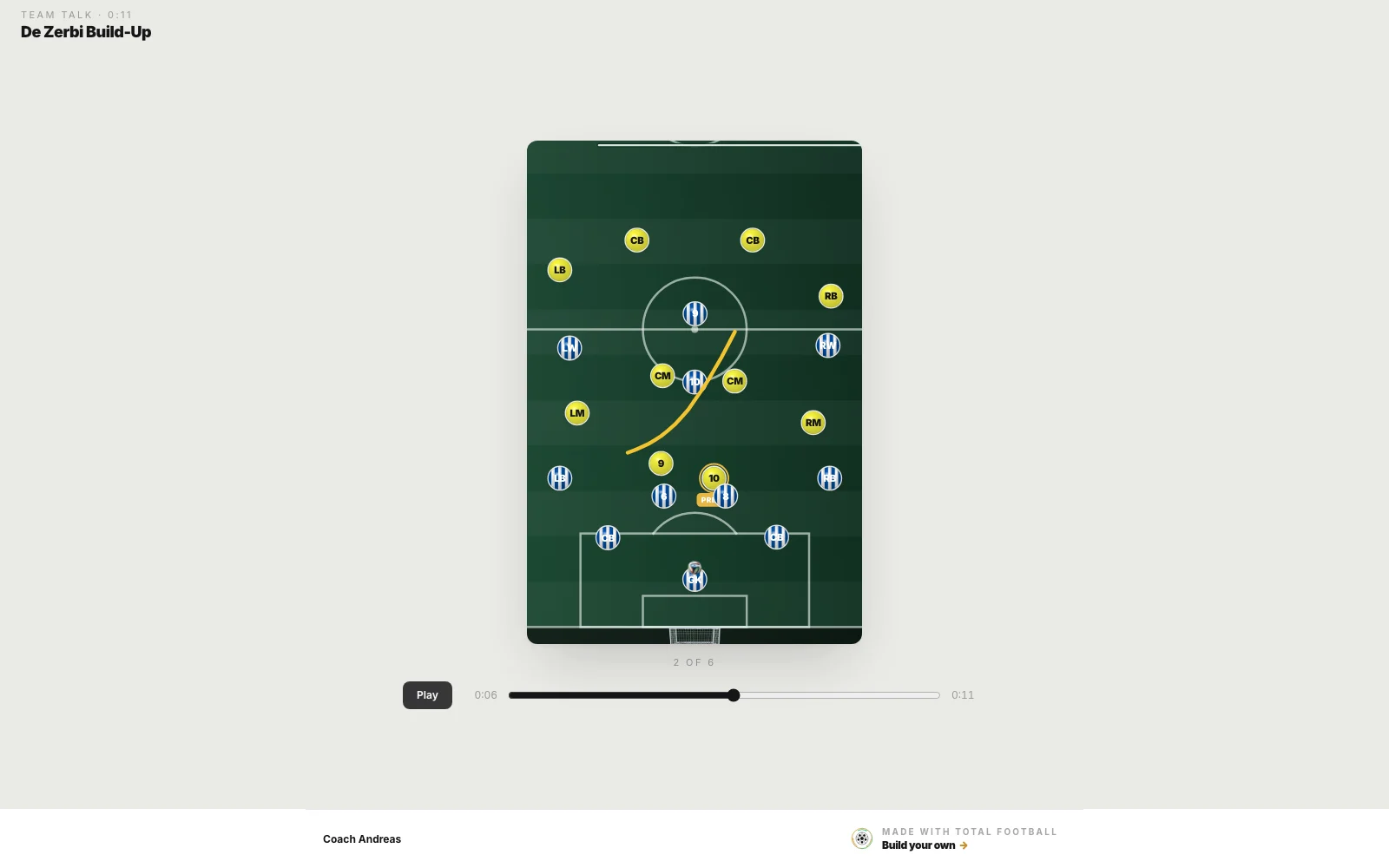
-
Team Talk
Press Record and talk your squad through the phases, stepping with the arrows and drawing with the pen. They get one link that plays your voice in time with the board, or an MP4 with your voice on it.
-
Present live
Open a room and send the link. Players join from any browser with just a name and follow every step and every pen stroke as you make it. Use your usual call for the voice.
-
Hand the pen
In a live session, hand the pen to a colleague who joined signed in. They step, draw and move players for everyone.
-
Your staff on the same board
Invite the coaches you work with to view or edit, your whole collection or one system. The invitation names who sent it, and can go by email too.
-
Saved as you go
Every change is kept as you make it, and signed in, your systems live on your account as well, on every device.
-
iPhone and iPad
TotalFootball Studio for iPhone and iPad signs in with the same account, so the board built at the desk is the one you step through on the grass. Free, iOS 17 or later.
-
Find any tool by typing it
Press ⌘K, or Ctrl+K, and type what you are looking for. Help answers in a coach's words and rings the control on screen.
Recently added
It gets better most weeks.
The newest 8 of 72 changes, each listed in the studio itself behind the bell.
- new The pitch leans back, and the camera flies
- better Team invites you can find
- better Player cards: flags, and faces kept clear
- new Player cards, and faces in the counters
- new Team Talk: your voice over the board
- new You told us, so we fixed it
- new Focus, trajectories and arrows your way
- new The studio is on iPhone and iPad
Build the first one tonight.
Free, nothing to install, and it runs in the browser you already have open. Sign in with Google or Apple and you are on the board.